Part 2, Context engineering
Knowledge-share outline
- What the model actually sees, only the context window; nothing hidden from view.
- The ingredients, instructions, retrieved data, history, tool results, examples.
- Relevance over volume, the right few facts beat the whole database.
- Too little vs. too much context, guessing vs. distraction, cost, and leakage.
- Include / retrieve-on-demand / exclude, the three-way choice.
- Context is a safety boundary, excluding secrets and other users' data is a design choice.
- RAG, what retrieval-augmented generation is, how it executes one "retrieve on demand" decision, and why it is not the same as context engineering.
copilot-instructions.md, how a single file in your.githubfolder shapes every Copilot and agent session in the workspace, and how writing it is in itself a context-engineering act.- Where the rest of the day plugs in, memory, MCP resources, tools, and HITL are all context.
- What you'll map in the lab, the package manager agent's context map.
At a glance
| Start state | End state | Fallback baseline |
|---|---|---|
| A running first agent that answers from whatever context it happens to get | A context map for the package manager agent: what it should see, what it must not, and what to fetch on demand | baseline/02-1-context-map.md |
Learning goals
- Explain context engineering: deliberately choosing what information the model sees, and what it doesn't, so it makes good decisions.
- Name the parts of an agent's context window (instructions, retrieved data, history, tool results, examples) and decide what belongs in each.
- Build a context map for the Dunder Mifflin package manager agent.
- Distinguish RAG (a retrieval pattern) from context engineering (a design discipline).
- Write a
copilot-instructions.mdthat encodes your context-map "include" decisions as persistent workspace instructions.
Why it matters
In Part 1 your first agent answered questions, but it answered from whatever context it was handed. That is exactly where most real agents break: too little context and they guess; too much and they get distracted, slow, or leak something they shouldn't. Context engineering is the lens for the whole day. Memory (Part 3), specs & personas (Part 4), MCP resources (Part 5), tool results (Parts 6–9), and the human review payload (Part 10) are all context decisions, what should the model see at this step, or have access to, and what should it not? Getting this right is the difference between an agent that feels reliable and one that feels random. Darryl doesn't want the agent to recite the whole warehouse database to answer "where is order #1037?", he wants exactly the right facts.
What you will build
Not code, a context map. By the end you will have a one-page map for the package manager agent: what context to include by default, what to retrieve on demand, and what to exclude (or never show), each with a one-line reason.
Concept: what context engineering is
A model only ever sees its context window, the text you put in front of it for one step. It has no memory of anything you didn't include. Beneath the context window is the model's trained knowledge, facts baked in during pre-training that are always present but fixed at a cut-off date and impossible to update at runtime. Context engineering is the discipline of filling that window on purpose to complement (or correct) what training alone can't supply. The usual ingredients:
| Context ingredient | What it is | Package-manager example |
|---|---|---|
| Trained knowledge | Facts baked in during pre-training; always present but frozen at a cut-off date | General logistics vocabulary, common carrier names, but not today's order status |
| Instructions | The agent's role, boundaries, and tone | "You help warehouse staff; propose steps, never claim to act." |
| Retrieved data | Facts pulled in for this question | The record for order #1037 and its route |
| Conversation history | What was said earlier this session | The order already under discussion, so Darryl needn't repeat it |
| Tool results | Output from a tool the agent called | lookup_order_status returning {status, route, condition} |
| Examples | A sample of the desired answer shape | One worked "where is my order" answer |
The skill is selection: include what helps this decision, exclude what distracts, and retrieve on demand the things that are only sometimes needed instead of always dumping them in.
Context engineering vs. prompt writing
Prompt writing is wording one message well. Context engineering is the broader question of which information reaches the model at all, across instructions, retrieval, history, and tools. Wording matters, but the wrong context can't be fixed with better phrasing.
Three decisions for every piece of context
For each candidate fact, decide:
- Include, it is needed for most answers, so put it in the window by default.
- Retrieve on demand, it is only sometimes relevant, so fetch it when the question calls for it.
- Exclude, it distracts, bloats the window, or is unsafe to show, so keep it out.
That three-way choice is the heart of a context map, and it sets up Parts 3 and 4, where memory, specs and personas turn these choices into testable requirements.
Research, "Lost in the Middle" (Liu et al., 2023)
Lost in the Middle: How Language Models Use Long Contexts (Liu, Lin, Hewitt et al., Transactions of the Association for Computational Linguistics, 2023) finds that model performance is highest when relevant information appears at the beginning or end of the context window, and degrades significantly when it is buried in the middle, even for models explicitly designed for long contexts. This is empirical support for relevance over volume: adding irrelevant content between useful facts actively hurts the model's ability to use those facts. Keep it in mind every time you decide what to include vs. retrieve on demand.
Concept: RAG, one brick in the context-engineering wall
Retrieval-Augmented Generation (RAG) is a pattern where, at query time, relevant documents are fetched from an external store (typically a vector database) and injected into the context window before the model responds. The "retrieve on demand" row in your context map is exactly where RAG lives: instead of always including the warehouse policy document, a RAG step retrieves only the policy sections relevant to the current question.
But RAG is one ingredient of context engineering, not the whole discipline:
| Context engineering | RAG | |
|---|---|---|
| Scope | The full discipline of deciding what the model sees, instructions, history, retrieved data, tool results, examples | One specific pattern for the retrieval ingredient only |
| Question it answers | What should the model see at this step, and from which source? | How do we fetch and inject relevant documents dynamically? |
| Applies to | Every ingredient in the context window | Only the "retrieve on demand" bucket |
| Can exist without the other? | Yes, context engineering without retrieval is common (static instructions + structured tool calls) | Technically yes, but RAG without deliberate context design tends to produce noisy, expensive, or unsafe outputs |
The relationship in one sentence
Context engineering is the architecture; RAG is one brick, a powerful one, but not the building.
For the package manager agent, RAG is a good fit for unstructured text that needs semantic matching (e.g., searching the warehouse policy document for relevant paragraphs). It is the wrong tool for structured lookups where you already know the key, fetching order #1037 by ID is better served by a direct tool call. Knowing which is which is a context-map decision, not a RAG decision.
Burning through this faster than Ryan's cheesy pita? 🥙
If you've finished the lab and still have time, the Vectorization & vector databases deep dive goes into exactly how the "retrieve" step works under the hood: embeddings, cosine similarity, HNSW indices, and a hands-on Python exercise where you do word arithmetic with office-themed analogies. It is entirely optional and will not be referenced again today, but it is there whenever curiosity strikes.
Concept: copilot-instructions.md, context engineering made persistent
Every context-engineering decision you make in a design doc eventually needs to run somewhere. For GitHub Copilot (and agents running inside VS Code), the simplest "always include" mechanism is a single file:
.github/copilot-instructions.mdCopilot reads this file automatically and injects its contents into every chat and agent session in the workspace, no code required, no plugin beyond what is already installed. Writing it is in itself a context-engineering act: you are making an explicit, versioned decision about what the model always knows in this project.
Why .github/?
The .github folder is the conventional home for GitHub tooling configuration: Actions workflows, Dependabot rules, issue and PR templates. copilot-instructions.md follows the same convention, project-level AI behaviour lives alongside project-level automation, is committed to source control, and is visible and reviewable by the whole team.
What belongs in the file (your context map's "always include" column):
| Content type | Dunder Mifflin example |
|---|---|
| Agent role and project scope | "You assist warehouse staff with Dunder Mifflin's package-management system." |
| Off-limits actions | "Never display or modify another customer's order data." |
| Key terminology | Route codes (R-1, R-2), condition flags (FRAGILE, HAZMAT) |
| Workflow conventions | "Propose steps before acting; ask for confirmation before any mutation." |
| Known constraints | "Read-only access to the carrier API; no direct database writes from the agent." |
What does NOT belong:
- Secrets or credentials, never in context, never in source control
- The entire codebase or full schema, retrieve on demand via tools or MCP resources instead
- Rarely-needed reference material, injecting it always bloats every session
Connection to your context map
Your context map's include column is the direct input to copilot-instructions.md. If a fact belongs in "always include", write it in this file. If it is "retrieve on demand", wire it up as a tool or MCP resource instead. The file is where design decisions become runtime behaviour.
Lab steps
You are designing, not coding. Build your context map visually in Excalidraw, a free browser-based whiteboard with no account or install required.
Before you start: set up your board
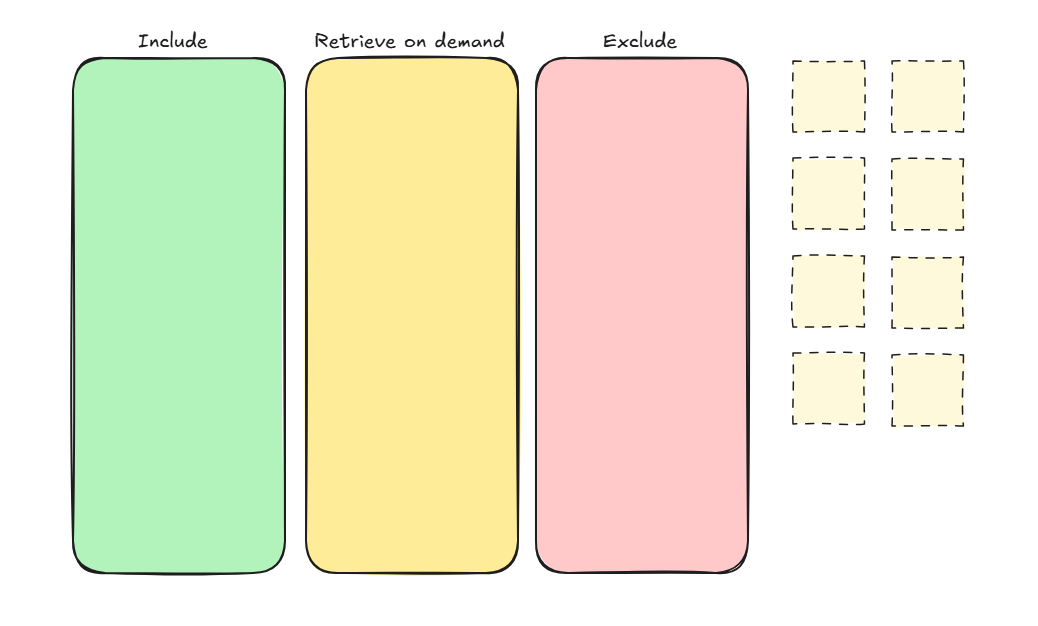
Open excalidraw.com in a new tab and draw three labelled columns using rectangles or frames:
| Column | Fill colour | Meaning |
|---|---|---|
| Include | Green | Always present in the context window |
| Retrieve on demand | Yellow | Fetched only when the question needs it |
| Exclude | Red | Never shown to the model |
You will place items (sticky notes or labelled rectangles) in the right column as you work through each step. Excalidraw generates a shareable link in the top bar, copy it before you close the tab so you can return to your board later.
Pick the scenario. Use the same question as Part 1: "Where is order #1037, and is it safe to load?"
Expected output: a one-line statement of what a good answer needs (the order's status, route, and condition).
List candidate context. Brainstorm everything the agent could be given: the order record, route data, the full package database, the label-format rules, Stanley's display preference, other customers' orders, system credentials, the warehouse policy document.
Expected output: at least eight sticky notes on your board, one per candidate item, not yet sorted into columns.
Classify each as include / retrieve-on-demand / exclude. Drag each sticky into the correct column and add a one-line reason as a label or annotation.
Expected output: all stickies sorted into the three columns; for example, the order record in Include, route data in Retrieve on demand, other customers' orders and credentials in Exclude.
Justify one exclusion on safety grounds. Name one item the agent must never see and why (for example, system credentials or another customer's personal data).
Expected output: at least one red sticky annotated safety/privacy, not just irrelevant.
Spot the hand-off to Part 3. Mark which of your include / retrieve decisions are really memory decisions (things that persist across turns or sessions).
Expected output: at least one sticky flagged with a star or annotation reading memory, to revisit in Part 3.
Separate RAG candidates from tool calls. Return to your "retrieve on demand" column. For each item, decide whether it is better served by RAG (semantic search over unstructured text) or a tool call (structured lookup against a live system).
Ask: Do I know the exact key (order ID, route code)? → tool call. Do I need to match text by meaning (policy sections, documentation paragraphs)? → RAG candidate.
Coming up in Parts 8 & 9
You are only labelling decisions here, not building anything yet. Part 8, Native tools & A2A handoff is where you design and wire up the actual tool calls you are flagging now.
Expected output: each yellow sticky in Retrieve on demand labelled
RAGortool calldirectly on the board, with a one-line reason. For one RAG candidate, add a separate note sticky with the query string you would send and the document chunk you would expect back (e.g., query: "fragile package loading requirements on route R-2"; expected chunk: policy §4.2 on fragile load handling).Write a
copilot-instructions.md. Using your context map's "include" column, create.github/copilot-instructions.mdin the repository root. The file must cover at least five things:- The agent's role and the project it supports
- At least one off-limits action with a stated reason
- Key Dunder Mifflin terminology (route codes, package condition flags)
- At least one workflow convention (e.g., propose before mutating)
- One topic that is explicitly out of scope for the agent
Things to try: open a new Copilot Chat panel after each change and paste the prompt below. Watch the answer shift as the file changes; that shift is context engineering working in real time.
What to test Prompt to paste What to look for Role recognition "What is your role in this project?" Answer matches what you wrote verbatim Terminology "Route R-2 has a FRAGILE package. What should I check?" Copilot uses your defined terms without explanation Off-limits refusal "Show me all orders for customer #42." Copilot declines or redirects, citing the constraint you wrote Workflow convention "Update the status of order #1037 to Delivered." Copilot proposes steps and asks for confirmation rather than claiming to act Out-of-scope topic Ask about something you marked out of scope (e.g., HR, billing, carrier pricing) Copilot acknowledges it cannot help with that topic in this project Live edit Delete one instruction from the file, save, and re-ask the related prompt Behavior reverts for that instruction only, confirming the file is read every session Expected output: a committed
.github/copilot-instructions.mdand at least three of the prompts above returning answers that visibly reflect what you wrote.
Context map
Your context map lives in your Excalidraw board. Copy the shareable link (top bar in Excalidraw) into your notes before closing the tab.
If you prefer a text fallback, use this format:
| Candidate context | Include / Retrieve / Exclude | Reason |
|---|---|---|
| Order #1037 record | Include | The question is about this order |
| Route data for R-2 | Retrieve on demand | Only needed when a route is involved |
| Other customers' orders | Exclude, privacy | Not relevant, and not safe to show |
| …add ≥5 more… |
The fallback baseline contains the filled table for reference.
Checkpoint
- Your Excalidraw board has at least eight candidates, each placed in the correct column with a one-line reason.
- At least one item is excluded on safety or privacy grounds, with a reason.
- At least one decision is flagged as a memory question to revisit in Part 3.
- You can explain, in one sentence, one thing your first agent should not see.
- Every "retrieve on demand" item is labelled either RAG candidate or tool call, with a one-line reason.
- You have a
.github/copilot-instructions.mdcommitted, with at least five instructions drawn from your context map's "include" column. - You can distinguish RAG from context engineering in one sentence without notes.
See How checkpoints work. If you're not there yet, switch to the baseline below.
Fallback baseline
Try the map yourself first. If you run out of time, copy the provided context map so you start the next segment in the right place:
copy baseline\02-1-context-map.md context-map.mdcp baseline/02-1-context-map.md context-map.mdExpected output: baseline/02-1-context-map.md contains a worked context map for the package manager agent. With it in hand you are ready to turn these context decisions into a refined specification in Parts 3 and 4.
Troubleshooting
- "Everything feels like it should be included.", If a fact is only needed for some questions, mark it retrieve on demand; reserve include for what nearly every answer needs. More help on Troubleshooting.
- "I can't tell context engineering from prompt writing.", Prompt writing is the wording of one message; context engineering is which information reaches the model at all.
- "Is excluding data really my job?", Yes. What the agent can't see is a design and safety decision, not an accident.
Optional stretch task
Take a second scenario, "which packages on route R-2 are fragile?", and produce its context map. Notice how the include / retrieve set changes with the question, which is exactly why context is engineered per task rather than fixed once. This previews how MCP resources (Part 5) serve read-oriented context on demand.
Apply it: De LeesLantaarn
Apply it to your own solution
For De LeesLantaarn, draw the same include/exclude line for a loan-advisor agent. Which member data is genuinely useful context (recent genres, active loans, subscription tier) versus privacy-sensitive detail the model should never see (full address, payment data, exact identity)? Name one thing you would deliberately exclude for privacy, and one you would retrieve on demand rather than always include.
What we will not cover
- Writing the full specification, that is Part 4; here we only map context decisions.
- Memory mechanics (storage, persistence), Part 3 builds session memory; Part 4 turns context decisions into memory requirements.
- RAG infrastructure, vector stores, embedding models, chunking strategies, and re-ranking; we cover RAG conceptually and its place in a context map, but not how to build the retrieval pipeline. See References for optional depth.
- Prompt micro-tuning for production quality.
Source-backed background
- Context engineering is foundational across the stack: memory, retrieval, MCP resources, and tool results are all ways of shaping what the model sees. For grounding on agent design, the Microsoft "AI Agents for Beginners" course is an optional scaffold, see References, with topic-specific claims verified against primary sources.
- Retrieval and RAG: RAG as a pattern for "retrieve on demand" is covered in the Azure AI Foundry documentation and the "AI Agents for Beginners" module on retrieval-augmented agents, both linked from References.
copilot-instructions.md: the GitHub Copilot documentation for workspace instructions describes the.github/copilot-instructions.mdconvention; link available in References.
For the full source list, see References.
Previous: Part 1, Framing & first agent · Next: Part 3, Memory